AI Image Editing Made Easy with Luminar Neo

With an intelligent image processing program like Luminar Neo, you can edit your photos automatically—creative, precise, and without any prior technical knowledge.
EDIT IMAGES WITH AI


Benefits of AI Image Editing

In this short video, you will see step-by-step how Luminar Neo helps you optimize your images easily.

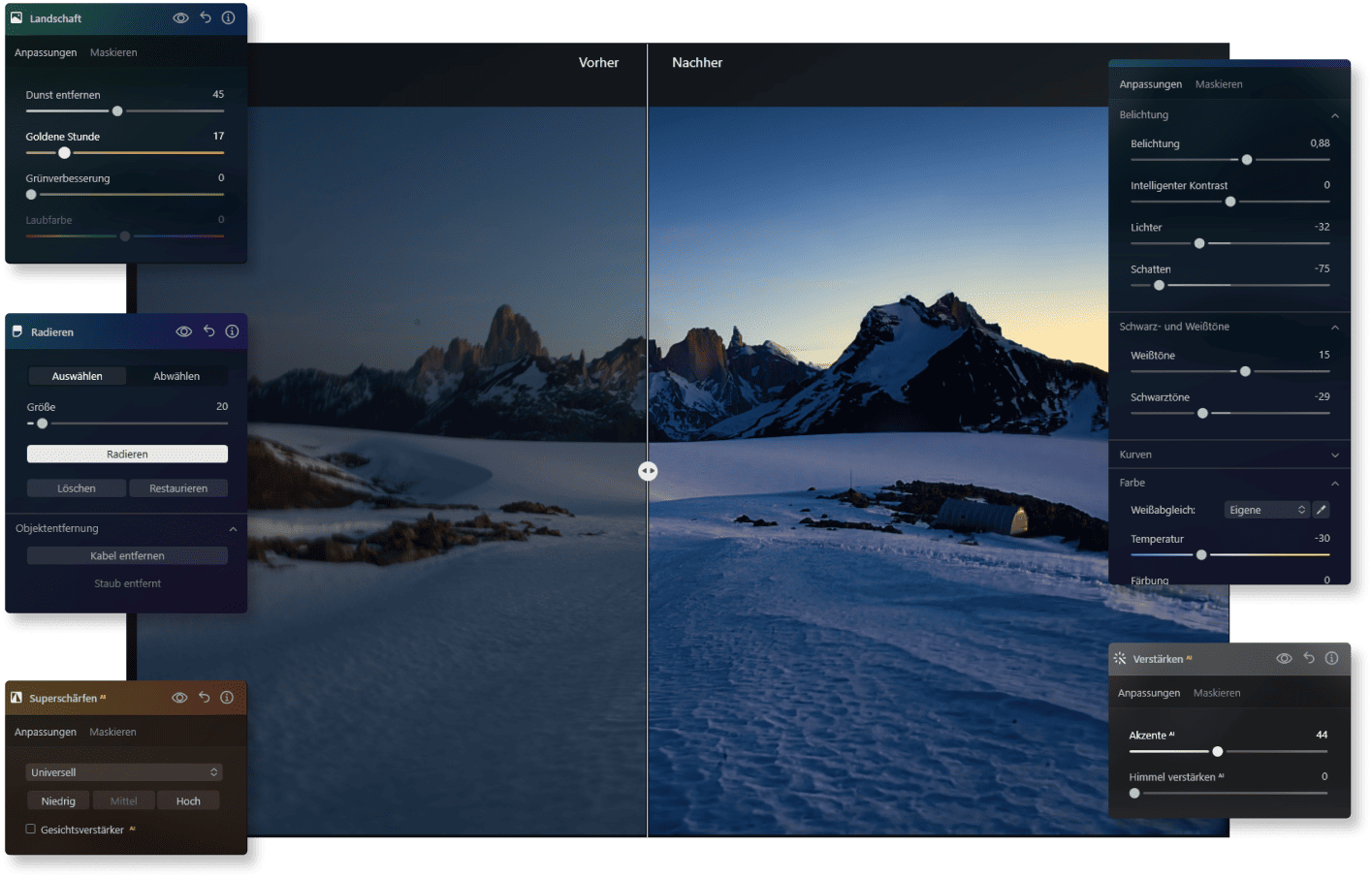
Before & After: How AI Image Editing Works

See for yourself how small adjustments can have a big impact, without complicated editing steps. Luminar Neo gets the most out of your product photos, creative artworks, or your new profile picture.

AI Image Editing—The Future of Photo Editing Is Now

You don’t have to be a pro to achieve professional results. With intelligent support from our image editing AI, you save time, maintain creative control, and achieve visible results faster.

AI Image Editing Features

With Luminar Neo, you get a whole package of intelligent features to improve your photos in a targeted way.
Erase-Tool-Symbol zur Bildoptimierung | LuminarNeo.de
Background Removal AIAI
Remove backgrounds accurately and quickly.
Portrait-Bokeh-Effekt im SVG-Design | LuminarNeo.de
Portrait with Bokeh AIAI
Creates a soft, professional background for portraits.
Struktur-AI Konzeptgrafik | LuminarNeo.de
Structure AIAI
Emphasizes important details and textures in the image.
Enhance-AI Feature Visualisierung | LuminarNeo.de
Enhance AIAI
Automatically improve photos.
Layers and Masking AIAI
Layers and masks for more creativity.
Erase-Tool-Symbol zur Bildoptimierung | LuminarNeo.de
Erase AIAI
Remove unwanted objects.
Symbol für Bearbeitungswerkzeug im SVG-Format | LuminarNeo.de
AI image enhancement
Use groundbreaking AI algorithms to automatically improve image quality, so you can get the most out of your photos with minimal effort.
Bearbeitungssymbol im minimalistischen SVG-Design | LuminarNeo.de
Raw processing
Work directly with RAW files to achieve maximum quality and detail, and to have more control over your final image.
Kreatives Symbol aus der UI | LuminarNeo.de
Layer support
Layer multiple images, adjustments, or effects on top of each other to create complex compositions or subtle enhancements with full control.
Symbol für kreative Tools im SVG-Format | LuminarNeo.de
Non-destructive processing
Make edits without altering the original image file, so that your original data always remains intact and accessible.
Bearbeitungssymbol im SVG-Design | LuminarNeo.de
Lens correction
Automatically correct lens distortion, chromatic aberrations, and vignetting to improve image quality and accuracy.
Footer-Symbol für Werkzeuge | LuminarNeo.de
Cloning tools
With the precise, user-friendly cloning functions, you can effortlessly remove unwanted elements or replicate parts of your images.
Symbol für Designwerkzeuge im SVG-Format | LuminarNeo.de
Dodge & Burn
You can selectively lighten or darken areas of your image, adding depth and emphasis to the key elements of your composition.
Symbol für detaillierte Bearbeitung | LuminarNeo.de
Color improvement
Optimize the colors in your photos to achieve vibrant, true-to-life hues, or create stylized looks that match your creative vision.
Symbol für fortschrittliche Bearbeitung | LuminarNeo.de
Crop and resize
Adjust the crop and size of your photos with the precise cropping and resizing tools - ideal for composition adjustments or format requirements.
Bearbeitungssymbol im kreativen Stil | LuminarNeo.de
Batch processing
Apply edits efficiently to multiple photos simultaneously to save time and ensure consistency across a range of images.

Get Started with AI Image Editing Now

Try Luminar Neo

Take the next step and edit your photos faster, more precisely, and more creatively.

What Our Customers Say about Luminar Neo

Hobby photographers and professionals alike are convinced by the ease of use and fast results. What is particularly appreciated is how intuitively creative ideas can be implemented with this image editing AI without any technical prior knowledge.

Testimonials-Icon für Nutzerfeedback | LuminarNeo.de Testimonials-Icon für Nutzerfeedback | LuminarNeo.de Testimonials-Icon für Nutzerfeedback | LuminarNeo.de Testimonials-Icon für Nutzerfeedback | LuminarNeo.de Testimonials-Icon für Nutzerfeedback | LuminarNeo.de
November 21, 2024
Ich bin von Luminar Neo begeistert!
Ich bin von Luminar Neo grundsätzlich begeistert! Einfach bedienbare Software mit sehr guten Ergebnissen. Natürlich muss man sich etwas damit beschäftigen, evtl. auch einige ...
Tutorials ansehen, es zahlt sich jedenfalls aus! Etwas mühsam für mich ist das exportieren der Bilder, da Luminar Neo nicht auf die Daten der Festplatte zurückgreift! Außerdem wird mit der Bearbeitung jede Menge Datenmüll produziert. Kann dieser evtl. gelöscht werden? ... aber das, was die Software tun soll - Bilder bearbeiten und verschönern - macht sie hervorragend! LG Siegfried
Mehr anzeigen
Siegfried Bodner
Testimonials-Icon für Nutzerfeedback | LuminarNeo.de Testimonials-Icon für Nutzerfeedback | LuminarNeo.de Testimonials-Icon für Nutzerfeedback | LuminarNeo.de Testimonials-Icon für Nutzerfeedback | LuminarNeo.de Testimonials-Icon für Nutzerfeedback | LuminarNeo.de
Super Programm
November 15, 2024
Ich nutze das Programm seit einem Jahr. Vorher habe ich schon Bezahlversionen anderer Anbieter und auch Freeware ausprobiert. Die Nutzung von Luminar ist einfach ...
intuitiv. Einfach und effizient. Genau das ist nötig für Hobbyfotografen, die nicht gleich ein Softwarestudium für die professionelle Fotobearbeitung anstreben. Die Ergebnisse sind top, vor allem das generative Löschen ist sensationell. Danke und weiter so!
Mehr anzeigen
U.L
Testimonials-Icon für Nutzerfeedback | LuminarNeo.de Testimonials-Icon für Nutzerfeedback | LuminarNeo.de Testimonials-Icon für Nutzerfeedback | LuminarNeo.de Testimonials-Icon für Nutzerfeedback | LuminarNeo.de Testimonials-Icon für Nutzerfeedback | LuminarNeo.de
March 10, 2025
Ich liebe dieses Programm
Ich liebe dieses Programm. Es ist super easy schnell gute Ergebnisse zu erziehen. Man kann ein Abo abschließen für mehr Funktionen ect aber muss ...
das nicht. Nicht wie Adobe … Es ist kein klassisches bearbeitungsprogramm wie Photoshop aber mach was es macht extrem gut. Leider muss man viele Erweiterungen wie extra Himmel … selbst hinzufügen. Das es diese Funktion gibt eigenes hinzuzufügen ist mega aber das man selbst bei gekauften Extras alles selbst hinzufügen muss ist wirklich unterirdisch. Dennoch 5 Sterne da man das nur einmal machen muss und ansonsten ein sehr gutes Programm hat. Ps sehr netter Support. Wenn ihr wie ich das Problem habt das die ki beim austauschen von Inhalten im Foto nicht funktioniert dann einfach alles auf Englisch schreiben. In deutsch ist die ki leider noch nicht so gut. Aber mit jedem Update merkt man das sich was tut
Mehr anzeigen
Alex
Testimonials-Icon für Nutzerfeedback | LuminarNeo.de Testimonials-Icon für Nutzerfeedback | LuminarNeo.de Testimonials-Icon für Nutzerfeedback | LuminarNeo.de Testimonials-Icon für Nutzerfeedback | LuminarNeo.de Testimonials-Icon für Nutzerfeedback | LuminarNeo.de
January 16, 2025
Super Service
Ich bin bereits im Besitz von Luminar 4 und Luminar mobile und sehr zufrieden mit der Sofware! Ich habe mir vor kurzem Luminar Neo ...
zugelegt, leider hat die Installation auf dem Laptop nicht funktioniert (Software stürzte beim Start immer ab) daraufhin habe ich Kontakt mit dem Kundenservice aufgenommen, dieser hat sich umgehend um mein Problem gekümmert. Ich bekam detaillierte Anweisungen über den Online-Chat bzw. per Mail, der Service hatte ein paar Fragen zu den Fehlermeldungen, ich habe das Error-Protokoll an der Service gesendet und dieser brachte dann das Progamm umgehend zum laufen! Ich persönlich habe eine sehr positive Erfahrung mit dem Kundenservice gemacht und kann diesen bei Problemen oder Fragen nur empfehlen. Danke nochmal an das Servie-Team
Mehr anzeigen
Christian
Testimonials-Icon für Nutzerfeedback | LuminarNeo.de Testimonials-Icon für Nutzerfeedback | LuminarNeo.de Testimonials-Icon für Nutzerfeedback | LuminarNeo.de Testimonials-Icon für Nutzerfeedback | LuminarNeo.de Testimonials-Icon für Nutzerfeedback | LuminarNeo.de
February 12, 2025
Sowohl die Programme Luminar (alle…
Sowohl die Programme Luminar (alle Versionen) als auch der Service bei Problemen sind hervorragend. Die Programme bieten eine große Vielzahl an Bearbeitungsmöglichkeiten. Diese begeistern ...
mich persönlich immer wieder. Die Zusatz- und Erweiterungsprogramme halten sich in einem finanziell tragbaren Rahmen. Ich freue mich auf eine weiterhin gute Zusammenarbeit.
Mehr anzeigen
Rolf Smets

Frequently Asked Questions about AI Image Editing

What is AI image editing and how does it work?

Here, artificial intelligence takes over tasks that previously required a lot of time and know-how. You upload your image, and the software automatically recognizes faces, backgrounds, lighting conditions, and more—resulting in impressive results in just a few clicks.

What are the benefits of AI photo editing versus manual editing?

You save yourself hours of tedious retouching. Instead, the software takes over many steps for you—from exposure correction to detail enhancement. In the end, it’s always your decision how subtle or strong the changes should be.

Can an AI image editor create images from scratch?

Not exactly. Luminar Neo specializes in image editing AI, meaning it focuses on optimizing and transforming existing photos. While it doesn’t include text-to-image generation from scratch, it allows you to bring out the absolute best in your own shots with just a few clicks.

Which image file formats does Luminar Neo support for AI editing?

Luminar Neo supports all common formats such as JPEG, PNG, TIFF, and, of course, RAW files. This way, you can start working directly with your camera shots or mobile photos without any workarounds.

Is AI image editing suitable for beginners?

Absolutely! The Luminar Neo interface is designed so that you can start immediately without any prior experience. Most AI image editing features are self-explanatory, and the results speak for themselves. It’s ideal if you want to be creative without technical hurdles. Once you’re comfortable, you can even use the mobile app to edit your images on the go.