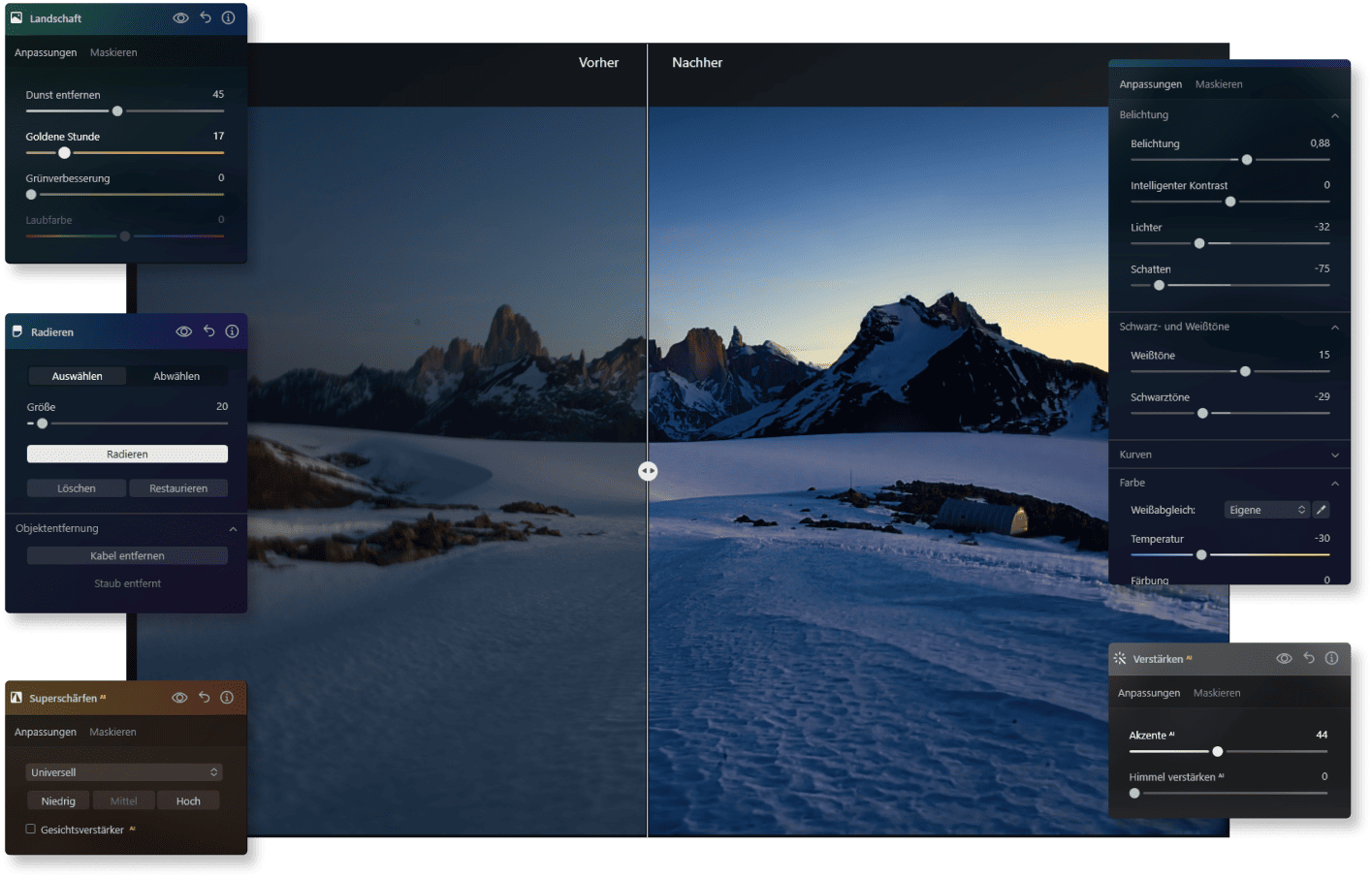
AI Image Editing Made Easy with Luminar Neo

With an intelligent image processing program like Luminar Neo, you can edit your photos automatically —creative, precise, and without any prior technical knowledge.
EDIT IMAGES WITH AI


Benefits of AI Image Editing

In this short video, you will see step-by-step how Luminar Neo helps you optimize your images easily.

Before & After: How AI Image Editing Works

See for yourself how small adjustments can have a big impact, without complicated editing steps. Luminar Neo gets the most out of your product photos, creative artworks, or your new profile picture.

AI Image Editing—The Future of Photo Editing Is Now

You don’t have to be a pro to achieve professional results. With intelligent support from our image editing AI, you save time, maintain creative control, and achieve visible results faster.

AI Image Editing Features

With Luminar Neo, you get a whole package of intelligent features to improve your photos in a targeted way.
Erase-Tool-Symbol zur Bildoptimierung | LuminarNeo.de
Background Removal AIAI
Remove backgrounds accurately and quickly.
Portrait-Bokeh-Effekt im SVG-Design | LuminarNeo.de
Portrait with Bokeh AIAI
Creates a soft, professional background for portraits.
Struktur-AI Konzeptgrafik | LuminarNeo.de
Structure AIAI
Emphasizes important details and textures in the image.
Enhance-AI Feature Visualisierung | LuminarNeo.de
Enhance AIAI
Automatically improve photos.
Layers and Masking AIAI
Layers and masks for more creativity.
Erase-Tool-Symbol zur Bildoptimierung | LuminarNeo.de
Erase AIAI
Remove unwanted objects.
Symbol für Bearbeitungswerkzeug im SVG-Format | LuminarNeo.de
AI image enhancement
Use groundbreaking AI algorithms to automatically improve image quality, so you can get the most out of your photos with minimal effort.
Bearbeitungssymbol im minimalistischen SVG-Design | LuminarNeo.de
Raw processing
Work directly with RAW files to achieve maximum quality and detail, and to have more control over your final image.
Kreatives Symbol aus der UI | LuminarNeo.de
Layer support
Layer multiple images, adjustments, or effects on top of each other to create complex compositions or subtle enhancements with full control.
Symbol für kreative Tools im SVG-Format | LuminarNeo.de
Non-destructive processing
Make edits without altering the original image file, so that your original data always remains intact and accessible.
Bearbeitungssymbol im SVG-Design | LuminarNeo.de
Lens correction
Automatically correct lens distortion, chromatic aberrations, and vignetting to improve image quality and accuracy.
Footer-Symbol für Werkzeuge | LuminarNeo.de
Cloning tools
With the precise, user-friendly cloning functions, you can effortlessly remove unwanted elements or replicate parts of your images.
Symbol für Designwerkzeuge im SVG-Format | LuminarNeo.de
Dodge & Burn
You can selectively lighten or darken areas of your image, adding depth and emphasis to the key elements of your composition.
Symbol für detaillierte Bearbeitung | LuminarNeo.de
Color improvement
Optimize the colors in your photos to achieve vibrant, true-to-life hues, or create stylized looks that match your creative vision.
Symbol für fortschrittliche Bearbeitung | LuminarNeo.de
Crop and resize
Adjust the crop and size of your photos with the precise cropping and resizing tools - ideal for composition adjustments or format requirements.
Bearbeitungssymbol im kreativen Stil | LuminarNeo.de
Batch processing
Apply edits efficiently to multiple photos simultaneously to save time and ensure consistency across a range of images.

Get Started with AI Image Editing Now

Try Luminar Neo

Take the next step and edit your photos faster, more precisely, and more creatively.

What Our Customers Say about Luminar Neo

Hobby photographers and professionals alike are convinced by the ease of use and fast results. What is particularly appreciated is how intuitively creative ideas can be implemented with this image editing AI without any technical prior knowledge.

Testimonials-Icon für Nutzerfeedback | LuminarNeo.de Testimonials-Icon für Nutzerfeedback | LuminarNeo.de Testimonials-Icon für Nutzerfeedback | LuminarNeo.de Testimonials-Icon für Nutzerfeedback | LuminarNeo.de Testimonials-Icon für Nutzerfeedback | LuminarNeo.de
November 21, 2024
I'm thrilled with Luminar Neo!
I'm generally thrilled with Luminar Neo! It's easy-to-use software with excellent results. Of course, you have to spend some time learning it, maybe even ...
watch a few tutorials, but it's definitely worth it! Exporting the images is a bit of a hassle for me, since Luminar Neo doesn't access the hard drive's data! Also, the editing process generates a lot of junk data. Is there any way to delete this? ...but what the software is supposed to do – edit and enhance images – it does exceptionally well! Best regards, Siegfried
Show more
Siegfried Bodner
Testimonials-Icon für Nutzerfeedback | LuminarNeo.de Testimonials-Icon für Nutzerfeedback | LuminarNeo.de Testimonials-Icon für Nutzerfeedback | LuminarNeo.de Testimonials-Icon für Nutzerfeedback | LuminarNeo.de Testimonials-Icon für Nutzerfeedback | LuminarNeo.de
Super Programm
November 15, 2024
I've been using the program for a year now. Before that, I tried paid versions from other providers as well as freeware. Luminar is ...
incredibly intuitive to use. Simple and efficient. That's exactly what's needed for amateur photographers who don't want to immediately pursue a degree in professional photo editing software. The results are excellent, especially the generative deletion feature, which is sensational. Thank you and keep up the good work!
Show more
U.L
Testimonials-Icon für Nutzerfeedback | LuminarNeo.de Testimonials-Icon für Nutzerfeedback | LuminarNeo.de Testimonials-Icon für Nutzerfeedback | LuminarNeo.de Testimonials-Icon für Nutzerfeedback | LuminarNeo.de Testimonials-Icon für Nutzerfeedback | LuminarNeo.de
March 10, 2025
I love this program
I love this program. It's super easy to quickly achieve great results. You can subscribe for more features, etc., but you don't have to. ...
Unlike Adobe... It's not a classic editing program like Photoshop, but it does what it does extremely well. Unfortunately, you have to add many extensions yourself, like extra skies, etc. The fact that it has this feature to add your own is fantastic, but having to add everything yourself, even with purchased extras, is truly awful. Nevertheless, 5 stars because you only have to do this once, and otherwise, it's a very good program. P.S. Very friendly support. If you, like me, have the problem that the AI ​​doesn't work when replacing content in a photo, just write everything in English. The AI ​​isn't very good in German yet. But with each update, you can see that things are improving.
Show more
Alex
Testimonials-Icon für Nutzerfeedback | LuminarNeo.de Testimonials-Icon für Nutzerfeedback | LuminarNeo.de Testimonials-Icon für Nutzerfeedback | LuminarNeo.de Testimonials-Icon für Nutzerfeedback | LuminarNeo.de Testimonials-Icon für Nutzerfeedback | LuminarNeo.de
January 16, 2025
Super Service
I already own Luminar 4 and Luminar Mobile and am very happy with the software! I recently purchased Luminar Neo, but unfortunately, the installation ...
on my laptop didn't work (the software kept crashing on startup). I contacted customer service, and they immediately addressed my problem. I received detailed instructions via online chat and email. The service team had a few questions about the error messages, so I sent them the error log, and they got the program working right away! I personally had a very positive experience with customer service and highly recommend them if you have any problems or questions. Thanks again to the service team!
Show more
Christian
Testimonials-Icon für Nutzerfeedback | LuminarNeo.de Testimonials-Icon für Nutzerfeedback | LuminarNeo.de Testimonials-Icon für Nutzerfeedback | LuminarNeo.de Testimonials-Icon für Nutzerfeedback | LuminarNeo.de Testimonials-Icon für Nutzerfeedback | LuminarNeo.de
February 12, 2025
Both the Luminar program (all…
Both the Luminar programs (all versions) and the customer service are excellent. The programs offer a wide range of editing options, which I find ...
consistently impressive. The additional and expansion programs are reasonably priced. I look forward to continued successful collaboration.
Show more
Rolf Smets

Frequently Asked Questions about AI Image Editing

What is AI image editing and how does it work?

Here, artificial intelligence takes over tasks that previously required a lot of time and know-how. You upload your image, and the software automatically recognizes faces, backgrounds, lighting conditions, and more—resulting in impressive results in just a few clicks.

What are the benefits of AI photo editing versus manual editing?

You save yourself hours of tedious retouching. Instead, the software takes over many steps for you—from exposure correction to detail enhancement. In the end, it’s always your decision how subtle or strong the changes should be.

Can an AI image editor create images from scratch?

Not exactly. Luminar Neo specializes in image editing AI, meaning it focuses on optimizing and transforming existing photos. While it doesn’t include text-to-image generation from scratch, it allows you to bring out the absolute best in your own shots with just a few clicks.

Which image file formats does Luminar Neo support for AI editing?

Luminar Neo supports all common formats such as JPEG, PNG, TIFF, and, of course, RAW files. This way, you can start working directly with your camera shots or mobile photos without any workarounds.

Is AI image editing suitable for beginners?

Absolutely! The Luminar Neo interface is designed so that you can start immediately without any prior experience. Most AI image editing features are self-explanatory, and the results speak for themselves. It’s ideal if you want to be creative without technical hurdles. Once you’re comfortable, you can even use the mobile app to edit your images on the go.