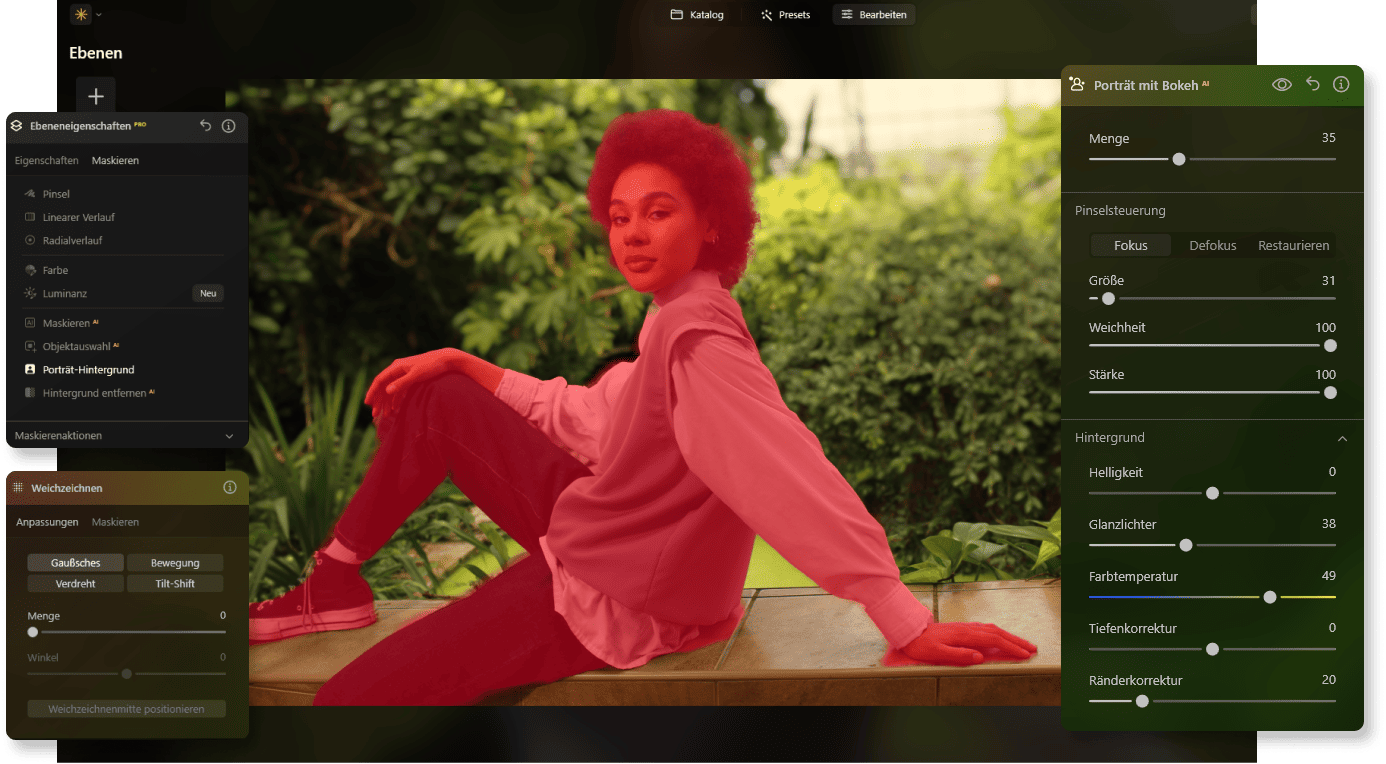
AI Background Blur for Professional Photos

With Luminar Neo, you can easily blur the background of a photo and guide attention to the subject. Create striking images where a soft background helps highlight the main element of the shot.
TRY IT NOW

Before and After: The Background Blur Effect

See the difference between the original image and the edited version with a blurred photo background. With just a few adjustments, you can soften the background and bring the subject into focus. Luminar Neo applies the effect smoothly, keeping the image natural and balanced.

Background Blur Made Easy

Watch the video to see how to blur the background of a photo and enhance the focus on the main subject.

Discover Creative Possibilities with Background Blur

With advanced editing tools, distracting elements can be minimized while the main focus remains clear, helping you create polished and professional-looking photos.


Symbol für Bearbeitungswerkzeug im SVG-Format | LuminarNeo.de
AI image enhancement
Use groundbreaking AI algorithms to automatically improve image quality, so you can get the most out of your photos with minimal effort.
Bearbeitungssymbol im minimalistischen SVG-Design | LuminarNeo.de
Raw processing
Work directly with RAW files to achieve maximum quality and detail, and to have more control over your final image.
Kreatives Symbol aus der UI | LuminarNeo.de
Layer support
Layer multiple images, adjustments, or effects on top of each other to create complex compositions or subtle enhancements with full control.
Symbol für kreative Tools im SVG-Format | LuminarNeo.de
Non-destructive processing
Make edits without altering the original image file, so that your original data always remains intact and accessible.
Bearbeitungssymbol im SVG-Design | LuminarNeo.de
Lens correction
Automatically correct lens distortion, chromatic aberrations, and vignetting to improve image quality and accuracy.
Footer-Symbol für Werkzeuge | LuminarNeo.de
Cloning tools
With the precise, user-friendly cloning functions, you can effortlessly remove unwanted elements or replicate parts of your images.
Symbol für Designwerkzeuge im SVG-Format | LuminarNeo.de
Dodge & Burn
You can selectively lighten or darken areas of your image, adding depth and emphasis to the key elements of your composition.
Symbol für detaillierte Bearbeitung | LuminarNeo.de
Color improvement
Optimize the colors in your photos to achieve vibrant, true-to-life hues, or create stylized looks that match your creative vision.
Symbol für fortschrittliche Bearbeitung | LuminarNeo.de
Crop and resize
Adjust the crop and size of your photos with the precise cropping and resizing tools - ideal for composition adjustments or format requirements.
Bearbeitungssymbol im kreativen Stil | LuminarNeo.de
Batch processing
Apply edits efficiently to multiple photos simultaneously to save time and ensure consistency across a range of images.

How to Blur Backgrounds with Luminar Neo

Luminar Neo lets you adjust background softness, highlight important details, and create visually striking results while keeping full control over the editing process.
Original
Edited
Add Bokeh

Try Luminar Neo Now

BUY NOW

Explore the powerful editing tools of Luminar Neo and take your photos to the next level.

AI-Powered Tools for Blurred Backgrounds

Luminar Neo includes a wide range of advanced tools designed to improve your images.
Supersharp AIAI
Restore image sharpness naturally using our technology.
Erase-Tool-Symbol zur Bildoptimierung | LuminarNeo.de
Background Removal AIAI
Remove backgrounds quickly and accurately.
Struktur-AI Konzeptgrafik | LuminarNeo.de
Structure AIAI
Enhance important details and textures in your image.
Enhance-AI Feature Visualisierung | LuminarNeo.de
Enhance AIAI
Automatically improve your photos.
LuminarNeo Auszeichnung für beste Fotobearbeitung | LuminarNeo.de
Layers and Masking AIAI
Use layers and masks for greater creative control.
Erase-Tool-Symbol zur Bildoptimierung | LuminarNeo.de
Erase AIAI
Remove unwanted objects from your photos.

What Our Users Say about Luminar Neo

See how users enhance their images with Luminar Neo. Many highlight the ease of use and the natural results when softening backgrounds and refining their photos.

Testimonials-Icon für Nutzerfeedback | LuminarNeo.de Testimonials-Icon für Nutzerfeedback | LuminarNeo.de Testimonials-Icon für Nutzerfeedback | LuminarNeo.de Testimonials-Icon für Nutzerfeedback | LuminarNeo.de Testimonials-Icon für Nutzerfeedback | LuminarNeo.de
November 21, 2024
I'm thrilled with Luminar Neo!
I'm generally thrilled with Luminar Neo! It's easy-to-use software with excellent results. Of course, you have to spend some time learning it, maybe even ...
watch a few tutorials, but it's definitely worth it! Exporting the images is a bit of a hassle for me, since Luminar Neo doesn't access the hard drive's data! Also, the editing process generates a lot of junk data. Is there a way to delete this? ...but what the software is supposed to do—edit and enhance images—it does exceptionally well! Best regards, Siegfried
Show more
Siegfried Bodner
Testimonials-Icon für Nutzerfeedback | LuminarNeo.de Testimonials-Icon für Nutzerfeedback | LuminarNeo.de Testimonials-Icon für Nutzerfeedback | LuminarNeo.de Testimonials-Icon für Nutzerfeedback | LuminarNeo.de Testimonials-Icon für Nutzerfeedback | LuminarNeo.de
November 15, 2024
Super Programm
I've been using the program for a year now. Before that, I tried paid versions from other providers as well as freeware. Luminar is ...
incredibly intuitive to use. Simple and efficient. That's exactly what's needed for amateur photographers who don't want to immediately pursue a degree in professional photo editing software. The results are excellent, especially the generative erasure feature, which is sensational. Thank you, and keep up the good work!
Show more
U.L
Testimonials-Icon für Nutzerfeedback | LuminarNeo.de Testimonials-Icon für Nutzerfeedback | LuminarNeo.de Testimonials-Icon für Nutzerfeedback | LuminarNeo.de Testimonials-Icon für Nutzerfeedback | LuminarNeo.de Testimonials-Icon für Nutzerfeedback | LuminarNeo.de
November 06, 2024
Excellent service!
Nicolaus Bruhn
Testimonials-Icon für Nutzerfeedback | LuminarNeo.de Testimonials-Icon für Nutzerfeedback | LuminarNeo.de Testimonials-Icon für Nutzerfeedback | LuminarNeo.de Testimonials-Icon für Nutzerfeedback | LuminarNeo.de Testimonials-Icon für Nutzerfeedback | LuminarNeo.de
November 15, 2023
Great software that's easy to use…
Great software that's easy to use and excellent support! Thumbs up!
Michael Pettrich
Testimonials-Icon für Nutzerfeedback | LuminarNeo.de Testimonials-Icon für Nutzerfeedback | LuminarNeo.de Testimonials-Icon für Nutzerfeedback | LuminarNeo.de Testimonials-Icon für Nutzerfeedback | LuminarNeo.de Testimonials-Icon für Nutzerfeedback | LuminarNeo.de
December 18, 2022
Skylum Luminar Neo - a top tool
Skylum has developed a fantastic program with Luminar (currently Neo). You can buy it outright or use it via a subscription. The subscription offers ...
additional extra tools that would otherwise cost a lot of money. It's quick to learn and you can easily achieve impressive results. It's especially suitable for casual users who don't want to spend a lot of time learning the ropes. Unfortunately, it's also very resource-intensive, so you'll need modern hardware.
Show more
Matthias

Frequently Asked Questions about Blurring Backgrounds

How can I blur the background of a photo?

With Luminar Neo, it’s easy to blur the background of a photo in just a few clicks. Use Portrait Bokeh AI to create a natural depth-of-field effect that helps your subject stand out and gives your image a more professional look.

What is the best way to blur the background of a selfie?

Portrait Bokeh AI is one of the easiest ways to create a natural photo background blur in selfies. The tool automatically detects the subject and lets you adjust the intensity of the effect for a balanced, realistic result.

Can I blur the background of a picture on my phone?

Yes. With Luminar Neo mobile, you can apply a blur background photo effect directly on your phone. Simply open your image, use the Portrait Bokeh tool, and adjust the blur to achieve the look you want.

Which image formats are supported by Luminar Neo?

Luminar Neo supports popular formats such as JPG and PNG, allowing youto edit and export images easily. The software works smoothly even with large files, so you can apply effects like image background blur without losing quality.

Does Luminar Neo offer a free trial?

Yes. Luminar Neo offers a free trial so you can explore its features before purchasing. You can test tools like AI background blur and other editing options to see how easily you can improve your photos.