Color Picker from Image: Identify Any Color Instantly

Detect color codes in seconds and use them for design, photography, branding, and creative projects. With advanced AI-powered tools, Luminar Neo helps you identify precise colors quickly and effortlessly.
Pick Colors Now
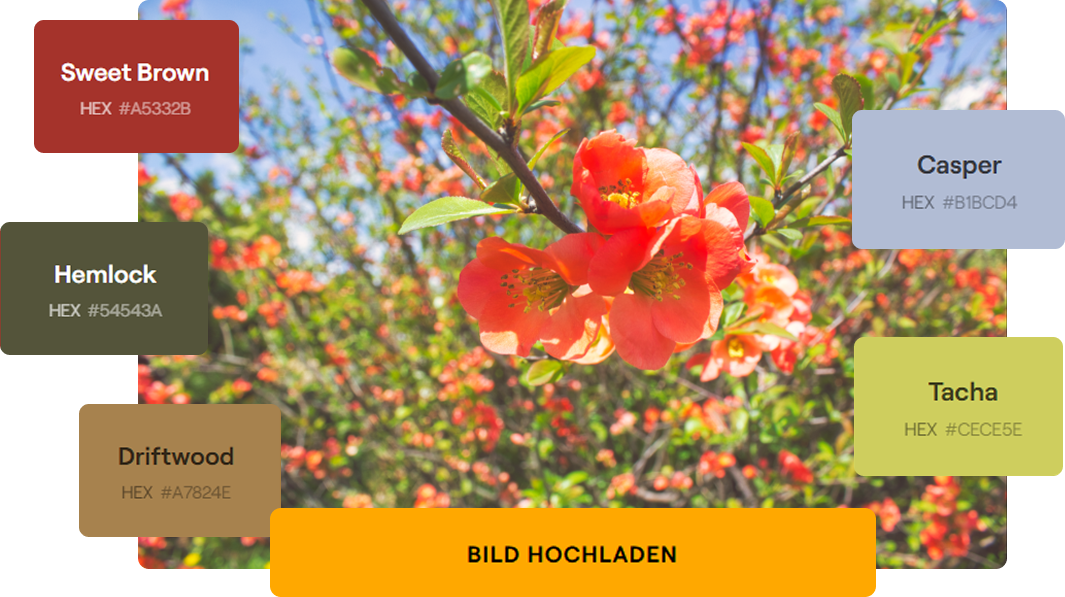
Color Picker from Image: The Key to a Perfect Look

With Luminar Neo, you can accurately identify color values and create harmonious color palettes for your projects. Perfect for designers, photographers, marketers, and content creators who care about visual precision.


Color palette of an image

Before & After: Precise Color Matching for Flawless Results

Compare images before and after color adjustments and see how easy it is to refine color palettes, improve visual consistency, and create stronger creative compositions.
Symbol für Bearbeitungswerkzeug im SVG-Format | LuminarNeo.de
AI image enhancement
Use groundbreaking AI algorithms to automatically improve image quality, so you can get the most out of your photos with minimal effort.
Bearbeitungssymbol im minimalistischen SVG-Design | LuminarNeo.de
Raw processing
Work directly with RAW files to achieve maximum quality and detail, and to have more control over your final image.
Kreatives Symbol aus der UI | LuminarNeo.de
Layer support
Layer multiple images, adjustments, or effects on top of each other to create complex compositions or subtle enhancements with full control.
Symbol für kreative Tools im SVG-Format | LuminarNeo.de
Non-destructive processing
Make edits without altering the original image file, so that your original data always remains intact and accessible.
Bearbeitungssymbol im SVG-Design | LuminarNeo.de
Lens correction
Automatically correct lens distortion, chromatic aberrations, and vignetting to improve image quality and accuracy.
Footer-Symbol für Werkzeuge | LuminarNeo.de
Cloning tools
With the precise, user-friendly cloning functions, you can effortlessly remove unwanted elements or replicate parts of your images.
Symbol für Designwerkzeuge im SVG-Format | LuminarNeo.de
Dodge & Burn
You can selectively lighten or darken areas of your image, adding depth and emphasis to the key elements of your composition.
Symbol für detaillierte Bearbeitung | LuminarNeo.de
Color improvement
Optimize the colors in your photos to achieve vibrant, true-to-life hues, or create stylized looks that match your creative vision.
Symbol für fortschrittliche Bearbeitung | LuminarNeo.de
Crop and resize
Adjust the crop and size of your photos with the precise cropping and resizing tools - ideal for composition adjustments or format requirements.
Bearbeitungssymbol im kreativen Stil | LuminarNeo.de
Batch processing
Apply edits efficiently to multiple photos simultaneously to save time and ensure consistency across a range of images.

Features That Help You Identify Colors Precisely and Make Your Images Shine

Luminar Neo includes powerful editing tools that help you identify colors accurately while improving your photos and designs:
Turn your photos into unique paintings or drawings in just a few clicks.
Replace Color in Image: Simply select and replace the color of objects.
Create collages, add photos with transparency and overlay images in Luminar.
Improve your photos in seconds - maximum quality and impressive details with only one click.
Enhance sharpness, color, and detail, and get your results in seconds.
Get started with Luminar Neo now and transform your photos into professional masterpieces in seconds.
Auszeichnungs-Icon im SVG-Format | LuminarNeo.de
Professionelles Overlay-Bild | LuminarNeo.de
Neue Tipps-Bild mit informativem Design | LuminarNeo.de

Find Color Codes Instantly

Try Luminar Neo

Use Luminar Neo to detect color codes accurately and streamline your creative workflow with intelligent AI tools.

What Our Users Say

Designers, photographers, and creators appreciate the precise color detection tools in Luminar Neo and the time they save while building visual concepts and editing projects.

Testimonials-Icon für Nutzerfeedback | LuminarNeo.de Testimonials-Icon für Nutzerfeedback | LuminarNeo.de Testimonials-Icon für Nutzerfeedback | LuminarNeo.de Testimonials-Icon für Nutzerfeedback | LuminarNeo.de Testimonials-Icon für Nutzerfeedback | LuminarNeo.de
April 6, 2026
Ive been using Luminar since it was…
Ive been using Luminar since it was originally relased back in 2016 and currently use the Luminar NEO version. Brilliant program to plugs right ...
into Photoshop/Adobe Creative Suite. Essential program for my everyday work
Show more
BRADLEY SISSINS
Testimonials-Icon für Nutzerfeedback | LuminarNeo.de Testimonials-Icon für Nutzerfeedback | LuminarNeo.de Testimonials-Icon für Nutzerfeedback | LuminarNeo.de Testimonials-Icon für Nutzerfeedback | LuminarNeo.de Testimonials-Icon für Nutzerfeedback | LuminarNeo.de
April 3, 2026
Luminar Neo is THE tool I need for
Luminar Neo is THE tool I need for. It’s easy, intuitive and it offers a lot of possibilities. I’m not an expert in postprocessing ...
for sure I was able to pimp up my game thanks to Luminar Neo. And the icing on the cake, when you have a question or a problem, the customer care is incredibly fast to answer!
Show more
Sébastien
Testimonials-Icon für Nutzerfeedback | LuminarNeo.de Testimonials-Icon für Nutzerfeedback | LuminarNeo.de Testimonials-Icon für Nutzerfeedback | LuminarNeo.de Testimonials-Icon für Nutzerfeedback | LuminarNeo.de Testimonials-Icon für Nutzerfeedback | LuminarNeo.de
March 30, 2026
Best editing tool
Been a loyal user of Luminar since its inception, always part of my toolset.
Maz
Testimonials-Icon für Nutzerfeedback | LuminarNeo.de Testimonials-Icon für Nutzerfeedback | LuminarNeo.de Testimonials-Icon für Nutzerfeedback | LuminarNeo.de Testimonials-Icon für Nutzerfeedback | LuminarNeo.de Testimonials-Icon für Nutzerfeedback | LuminarNeo.de
March 30, 2026
The software is really fun to use
The software is really fun to use. You can get a lot out of your photos. It’s intuitive and very user-friendly. The support team ...
is quick to respond and very friendly. I’m very satisfied and would definitely recommend this software to others.
Show more
René Kolbe
Testimonials-Icon für Nutzerfeedback | LuminarNeo.de Testimonials-Icon für Nutzerfeedback | LuminarNeo.de Testimonials-Icon für Nutzerfeedback | LuminarNeo.de Testimonials-Icon für Nutzerfeedback | LuminarNeo.de Testimonials-Icon für Nutzerfeedback | LuminarNeo.de
March 28, 2026
The software is great and very user…
The software is great and very user friendly. The support provided is superior.
R Kumar

Frequently Asked Questions About the Color Picker

How Do I Pick a Color Code from an Image?

Yes. Luminar Neo lets you extract colors directly from images, whether from a single pixel or a larger area. You can view precise values in formats such as HEX, RGB, and CMYK.

Which Color Code Format Is Most Commonly Used?

HEX codes are the most commonly used format in web design, while RGB and CMYK are frequently used for photography, printing, and professional design work.

How Accurate Is the Color Identification?

The AI-powered technology in Luminar Neo can detect even subtle color differences, helping you make precise adjustments for editing, branding, and visual design.

What Image Formats Does Luminar Neo's Color Picker Support?

Luminar Neo supports JPEG, PNG, TIFF, RAW, and many other popular formats. RAW files are especially useful for photographers because they preserve more accurate color data directly from the camera sensor.

Is Luminar Neo's Color Picker Free?

You can try Luminar Neo for free before choosing between a subscription or permanent license for full access to all tools and features.