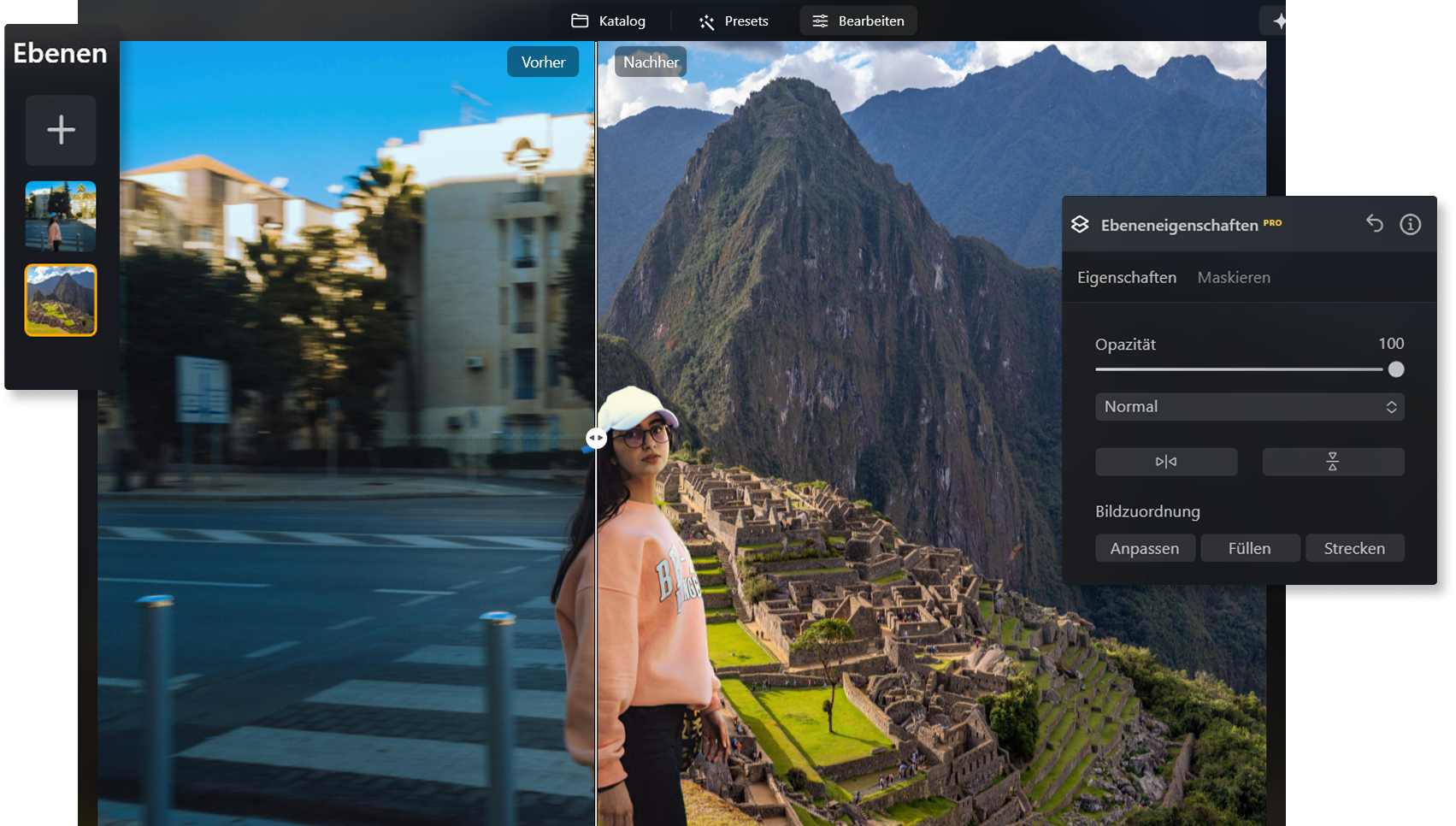
Photo Background Change—AI-Powered Background Swap in Seconds

Transform the background of your images in just a few clicks with a modern AI photo editor—no experience required. Works perfectly for transparent, solid-color, or creative custom backgrounds.
Change Background Now


How the Background Changer Works

A short video walks you through the entire process: upload your image, choose the AI background changer, select a new background from the gallery or upload your own, then save the final result as JPG or PNG.

Before and After: Perfect Results at a Glance

See the difference for yourself. Whether you need a product photo with a clean white background, a portrait with soft bokeh, or a creative design with patterns and textures, AI-powered background replacement delivers versatile, professional-looking results.

Why Change the Photo Background?

A new background can instantly make your image look more polished, creative, and professional.


For Product Images

A clean white or transparent background keeps the focus on your product and creates a professional look, ideal for e-commerce, catalogs, or presentations.


For Portraits and Social Media

Replace distracting environments with soft bokeh or stylish patterns to give your profile photos more impact and personality.


For Creative Projects

Use AI-generated backgrounds, experiment with colors and textures, or combine multiple layers to create unique visual compositions.


AI Tools That Perfect Your Background Change

With Luminar Neo, you get much more than just a background changer. These intelligent AI tools help you fully transform your photos:
Improve your photos in seconds - maximum quality and impressive details with only one click.
Remove background with AI in Luminar – quickly and automatically.
Create collages, add photos with transparency and overlay images in Luminar.
Creates a soft, professional background for portraits.
Remove unwanted people from your photos to achieve clear and professional results.
Emphasizes important details and textures in the image.

You can also upload your own backgrounds or choose from built-in pattern and color libraries, including AI-generated options.

Edit Photo Backgrounds with Ease

Start Editing with Luminar Neo

Upload your image, swap backgrounds in seconds, and create clean, professional-looking results with AI-powered editing.

What Our Customers Say About Luminar Neo

Our users love how AI-powered background replacement saves time, delivers visible improvements, and makes photo editing easier than ever.

Testimonials-Icon für Nutzerfeedback | LuminarNeo.de Testimonials-Icon für Nutzerfeedback | LuminarNeo.de Testimonials-Icon für Nutzerfeedback | LuminarNeo.de Testimonials-Icon für Nutzerfeedback | LuminarNeo.de Testimonials-Icon für Nutzerfeedback | LuminarNeo.de
February 26, 2025
3 years anniversary of Luminar Neo :)
I have been working with Luminar Neo right from the start. I can no longer imagine photo editing without LN. I am impressed by ...
how quickly you can achieve excellent results with LN. As a layman and amateur, at 78, I really enjoy it. The many effects, luts, presets, sky replacement, magic light, super sharp, twilight water optimizer... produce excellent results. The most important thing for me apart from the program is the hotline. I have had many questions that have ALWAYS been solved quickly and successfully. The precise information on how to solve the problem ALWAYS led to success. Thank you Skylum and team for the great work and good luck for the future.
Show more
Wilfrid
Testimonials-Icon für Nutzerfeedback | LuminarNeo.de Testimonials-Icon für Nutzerfeedback | LuminarNeo.de Testimonials-Icon für Nutzerfeedback | LuminarNeo.de Testimonials-Icon für Nutzerfeedback | LuminarNeo.de Testimonials-Icon für Nutzerfeedback | LuminarNeo.de
February 04, 2025
Very good program and a good value
Very good program and a good value. Like any software, there's a learning curve. I replaced Lightroom with this program because I refuse to ...
pay an annual fee. So far, I'm able to do what needs to be done. I'm a semi professional.
Show more
Robert Keller
Testimonials-Icon für Nutzerfeedback | LuminarNeo.de Testimonials-Icon für Nutzerfeedback | LuminarNeo.de Testimonials-Icon für Nutzerfeedback | LuminarNeo.de Testimonials-Icon für Nutzerfeedback | LuminarNeo.de Testimonials-Icon für Nutzerfeedback | LuminarNeo.de
January 31, 2025
I love Luminar Neo for its ease of use…
I love Luminar Neo for its ease of use and pleasing results. I wanted to edit my photos without going through all the steps ...
required by Lightroom. I have used 3 of the Luminar programs so far. My only problem was that Luminar stopped working on my computer (wouldn't boot up). Customer service walked me through the process of cleaning up my computer files so that Neo would work again. I appreciated that!
Show more
Liz Walters
Testimonials-Icon für Nutzerfeedback | LuminarNeo.de Testimonials-Icon für Nutzerfeedback | LuminarNeo.de Testimonials-Icon für Nutzerfeedback | LuminarNeo.de Testimonials-Icon für Nutzerfeedback | LuminarNeo.de Testimonials-Icon für Nutzerfeedback | LuminarNeo.de
April 15, 2026
superful app
superful app
Alex Liliana Pryima
Testimonials-Icon für Nutzerfeedback | LuminarNeo.de Testimonials-Icon für Nutzerfeedback | LuminarNeo.de Testimonials-Icon für Nutzerfeedback | LuminarNeo.de Testimonials-Icon für Nutzerfeedback | LuminarNeo.de Testimonials-Icon für Nutzerfeedback | LuminarNeo.de
April 11, 2026
User experience
I moved to Luminar Neo after Adobe raised its prices I don't regret at all. I can edit my photos easy or make some ...
more serious edits using AI tools if it's needed. I have a problem, technical support also works fine. I like it and can recommend it.
Show more
Marcin Maczkowski

Frequently Asked Questions About Photo Background Change

Is the background changer free?

You can try Luminar Neo for free and see the AI background changer in action. A license is required to unlock the full set of features, making it a great choice for anyone who edits photos regularly.

What image formats and sizes are supported?

You can upload JPG, PNG, and TIFF files. Large image sizes are also supported, making the tool suitable for print, web, and social media projects.

Can I upload custom backgrounds or use libraries?

Yes. You can use your own images as backgrounds or choose from a large library of patterns, colors, and AI-generated backgrounds available in Luminar Neo.

Can I change the background to white or another color?

Absolutely. You can switch between transparent, white, black, or custom-colored backgrounds depending on your project needs.

Is a mobile app available?

Luminar Neo is currently optimized for Windows and macOS. You can also edit photos on mobile devices with Luminar Mobile.

How can I further edit the results?

After replacing the background, you can continue improving your images with tools like portrait bokeh, color correction, object removal, masking, and layers. This helps you achieve polished, professional-looking results with minimal effort.